How to Use Flip My Space: AI Room Redesign in Under 60 Seconds
This post walks you through exactly how to use Flip My Space for an AI room redesign, the styles you can pick, who it's built for, and a few tips for getting results you'll actually want to show off.
What Is Flip My Space?
Flip My Space is an AI interior design tool that restyles your room from a single photo. You upload a picture, choose a look, and the AI hands back a photorealistic redesign in under 30 seconds.
It works for any room. Living room, bedroom, kitchen, or that awkward corner you've been ignoring for a year. You don't need design experience or any special gear, just a phone and a photo.
It's the kind of room makeover AI that feels a little bit magic the first time you try it. Watching a tired space transform in real time is honestly hard to look away from.
Step-by-Step: How to Use Flip My Space
The whole flow takes three steps and less than a minute. Here's how each one works.
Step 1: Take or choose a photo of your room
Start with a clear, well-lit photo. Natural daylight is your best friend here, so open the blinds and shoot in the morning or late afternoon when the light is soft and even.
Try to capture the whole room in one frame rather than a tight close-up. The more the AI can see of your walls, floor, and furniture, the more accurate the redesign comes out. A steady, eye-level shot beats a dramatic angle every time.
Step 2: Edit your layout or pick a new style
Now decide what kind of change you want. You can keep your existing layout and just refresh the styling, or go bold and pick a completely new aesthetic like Modern, Boho, or Scandinavian.
If you're redesigning a room you actually live in, choose a style that flatters what's already there. Lots of natural light and wood tones lean beautifully into Scandinavian or Boho, while a darker, cozier space can carry Modern or maximalist looks with confidence. This is the fun part of redesigning your room online, because you get to play art director.
Not sure which way to go? That's fine. The whole point is to experiment.
Step 3: Let the AI generate your redesign
Hit generate and let the AI home decorator do the heavy lifting. In a few seconds you get a photorealistic version of your room in the style you picked, with the furniture, textures, and lighting all in place.
If the first result isn't quite right, regenerate or try another style. Each pass is fast, so there's no harm in exploring a handful before you settle.
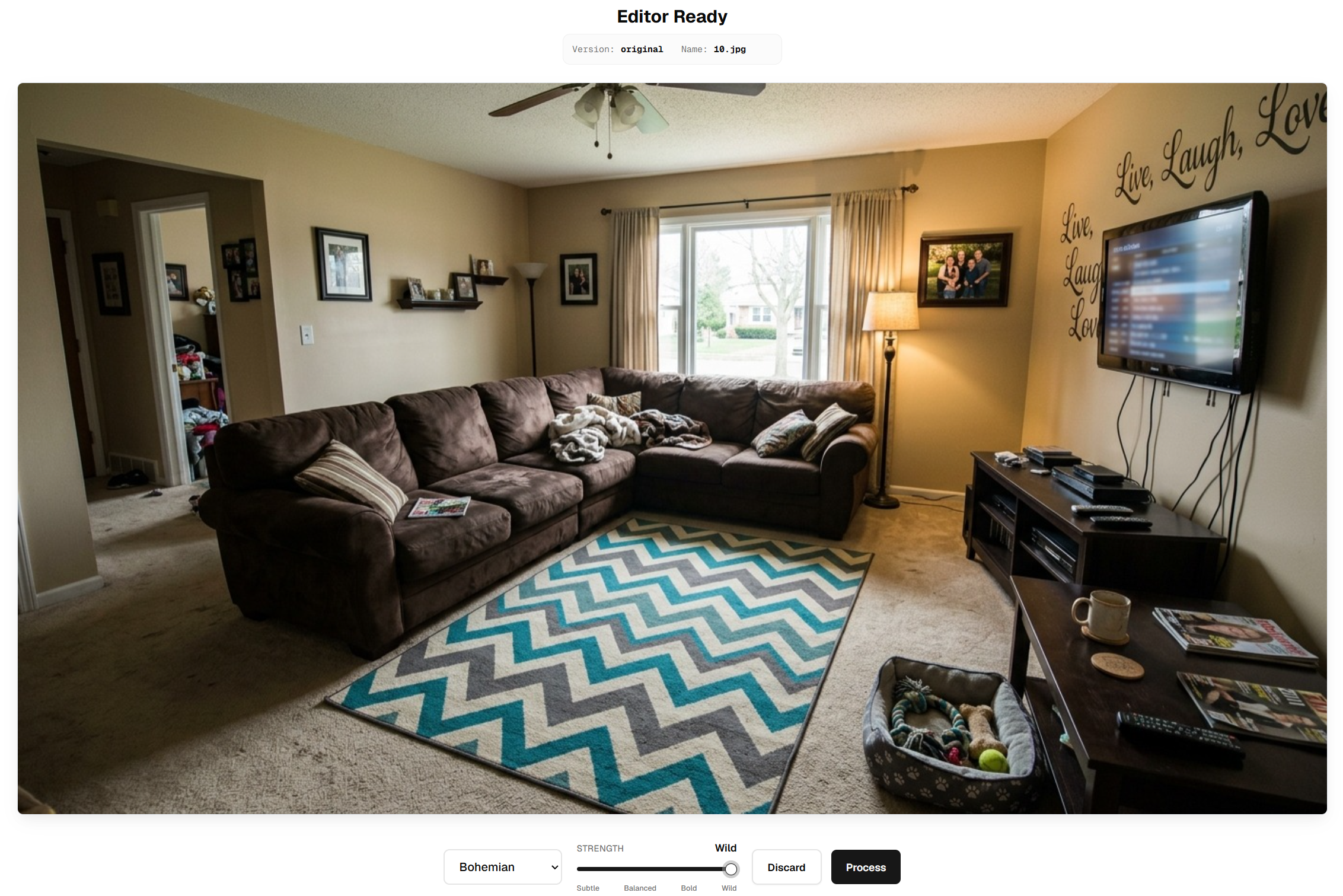
Here's the whole thing in action. First, you upload your photo and select a wild-strength Boho redesign.
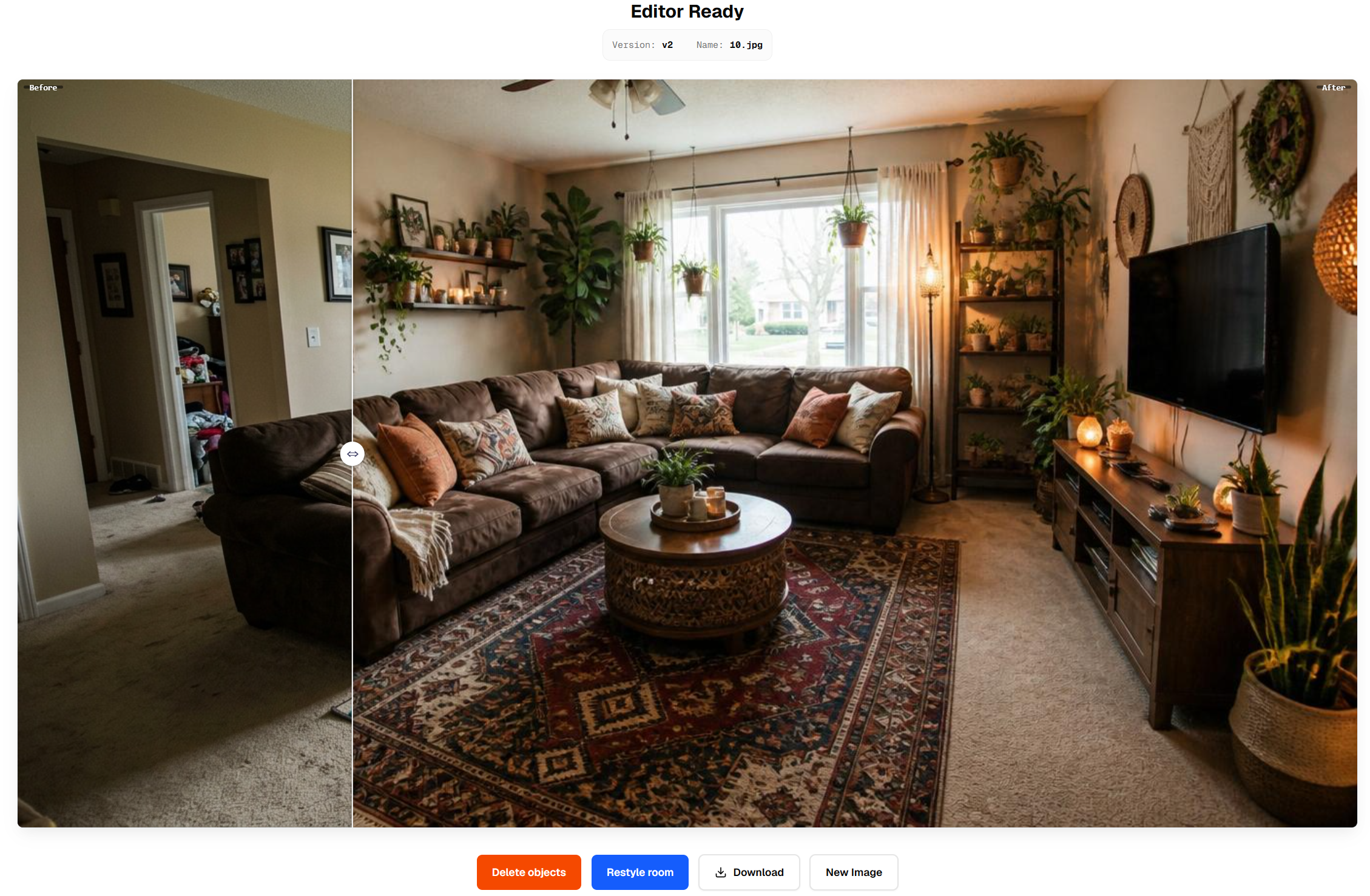
And now here's the result, complete with a slider you can drag to compare the before and after for yourself.
What Styles Can You Choose?
Flip My Space comes loaded with a range of aesthetics, so you're never boxed into one look. Go clean and airy with Modern or minimalist, warm and layered with Boho, or bright and natural with Scandinavian.
Want more drama? Maximalist leans into rich color, pattern, and personality, for the people who find white walls a little lonely. There's plenty of moods in between to match whatever feeling you're chasing.
Picking the right style matters more than you might think. A look that fits your room's light, size, and bones will always feel more believable than one fighting against them.
The best part of this AI interior design tool is how cheap and instant it is to experiment. At $1.99 for 10 redesigns, you can try five styles back to back and still have credits left for the next room.
Who Is It For?
Flip My Space is genuinely useful for a few different people.
If you're a homeowner itching to refresh your space, it lets you preview a whole new vibe before committing a single dollar to paint or furniture. You see the payoff first, then decide whether it's worth the renovation.
If you're selling your home, this is virtual room staging without the cost of the physical kind. You can restyle empty or dated rooms into warm, aspirational spaces that help your listing photos stop the scroll.
And if you're a renter, it's a low-risk way to visualize changes before you buy a thing. Picture that new sofa or rug in your actual room before it ever lands in your cart.
Why AI Room Redesign Beats Hiring a Designer
Let's be honest about what this is. For a full renovation with structural changes and custom sourcing, a human designer is still worth every penny.
But for inspiration and visualization, an AI interior design tool wins on every practical front. Speed: seconds instead of weeks. Cost: $1.99 for 10 redesigns instead of hundreds or thousands for a consultation. Access: anyone with a phone can do it, no appointments, no awkward budget conversations.
Most people don't need a months-long project. They just need to see the possibilities before they spend, and that's exactly where AI shines. You can test ten directions in the time it would take to schedule one designer call, and you can always see our pricing if you want more from your AI home decorator.
Tips for Getting the Best Results
A few small habits make a big difference in your output.
Shoot in natural light whenever you can. Daylight gives the AI clean color and detail to work with, while harsh overhead bulbs tend to flatten everything out.
Declutter before you upload. Clear surfaces and a tidy frame help the AI focus on the space itself instead of guessing its way around your piles of stuff.
Try a few styles before you decide. With 10 redesigns for $1.99, experimenting barely costs anything, so don't stop at the first render.
And work one room at a time. Giving each space your full attention produces sharper, more believable results than rushing through the whole house at once.
Ready to Flip Your Space?
There's never been an easier way to fall in love with your home again. In the time it takes to make a coffee, you can preview a whole new look and finally see what your room is capable of.
Go ahead and try Flip My Space, where 10 redesigns start at just $1.99. When you get a before and after you love, share it on TikTok and tag us. We genuinely can't wait to see what you make.